Gymnastics club software

Gymnastics Club Software for Classes, Terms and Private Coaching

Let parents book recreational classes by the term or pay session by session, cap every session to your coaches and space, fill drop-outs from a waitlist and run one-to-one coaching in the same diary. Free for 1–2 coaches.

Free forever for 1-2 staff and up to 5 services. Flat £10/month for unlimited staff and services. No marketplace commission.

The diary

Your whole day on one screen

The diary you run the business from, with everything about each appointment on it. These are real screens from Slotivo’s demo businesses.

Slotivo diary in Week view for a yoga teacher, showing each class with how many of its spaces are booked

Slotivo diary in Week view for a yoga teacher, showing each class with how many of its spaces are booked
  • Your timetable for the week, with spaces filled on every class.
  • Open a class to see who is coming, take payment or move someone to another class.
  • Classes and 1:1 appointments live in the same diary.
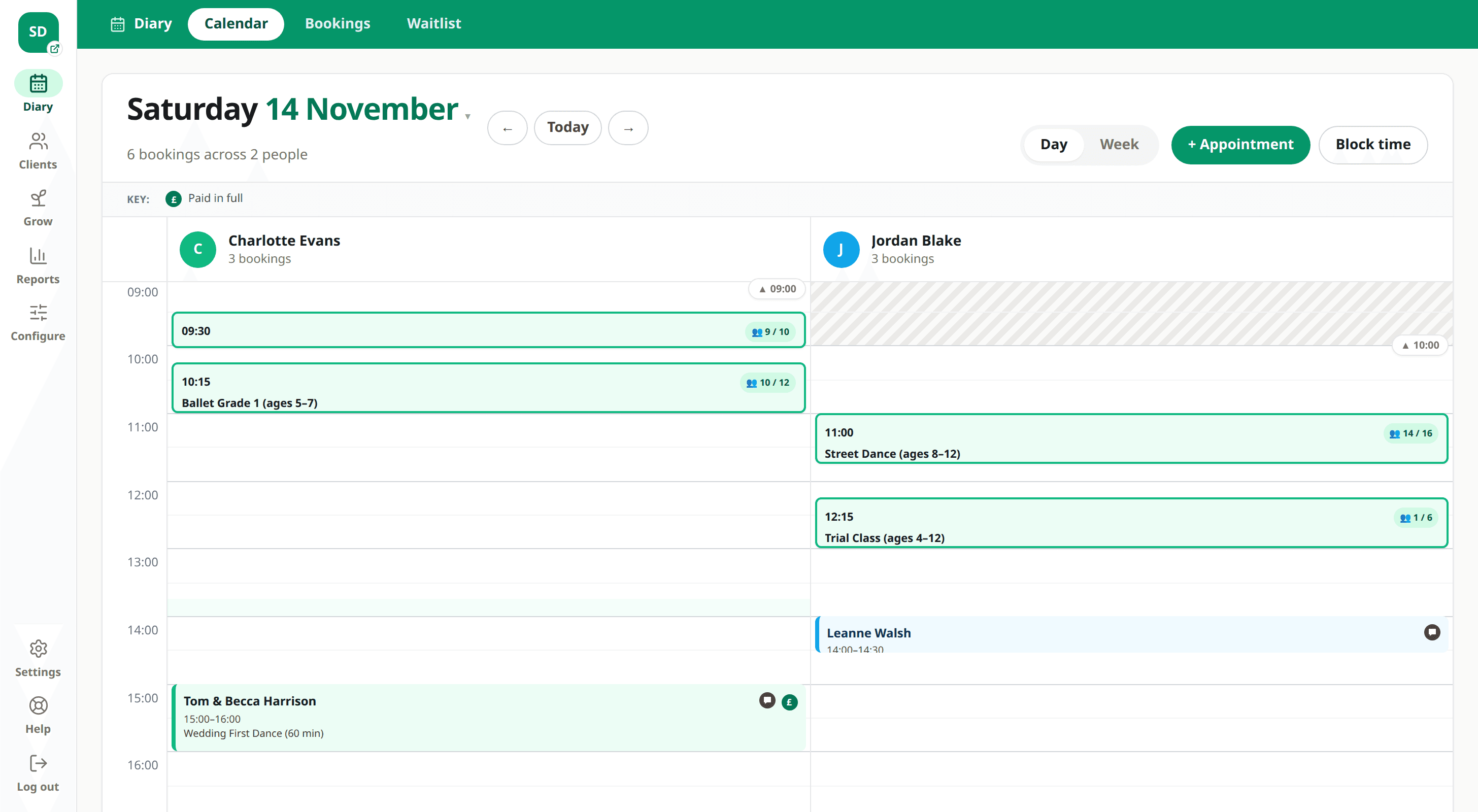
A Saturday in the Starlight Dance Academy diary with ballet, street dance and a trial class

Try a working children’s class business

See how Starlight Dance Academy runs in Slotivo

Our demo dance school runs the same way as a gymnastics club: pay-as-you-go and termly classes by age group, a weekly taster session, private lessons and real example family bookings.

Demo data resets automatically. Please do not enter real personal or payment information.

Recurring income

Sell class passes and memberships that clients book with

Get paid up front, keep regulars coming back, and stop chasing drop-in payments. Features marked “Paid plans” need Paid or Paid Plus. The rest work on every plan, Free included.

PassesPaid plans

Class passes

Sell packs such as 5 or 10 classes, with an optional use-by date and a choice of which classes they cover. Clients buy them on your booking page and book without paying each time. A cancelled booking gives the class back automatically.

See how it works
MembershipsPaid plans

Monthly memberships

A set number of classes a month, or unlimited, billed monthly by card into your own Stripe account until the member cancels.

No-show protectionPaid plans

Late-cancel fees for drop-ins

Drop-in clients save a card instead of paying a deposit. If they no-show or cancel late, you choose whether to charge the fee you set.

Learn more →
Discount codesPaid plans

Intro offers

A first-class-free or new-student code, limited to chosen classes and once per client.

Self-service rescheduling

Clients swap classes themselves

The booking email lets clients move to another time of the same class that still has space, instead of just not turning up.

Ticket typesPaid plans

Observers, spectators and mat hire

Sell more than one ticket on a class, each at its own price: “Class + mat hire” that uses a class place, or observer and parent-watching places with their own limit that never fill the class.

Learn more →
What you get

What a gymnastics club needs from its booking system

Everything below runs from one admin area, on the web or in the Slotivo app.

Places capped per session

Set the number of places for each session to match your coaches and space. Parents see how many are left and can’t book a full session.

Book the whole term, or pay as you go

Set a class up as a course with the weeks in your term, so parents book once, are booked onto every week and pay once. Or run it pay as you go, booked and paid for one session at a time.

Waitlists for full sessions

Families join the waitlist for the session that’s full. When a place comes free, the next family is emailed straight away, and if they don’t book within two hours it goes to the next.

Private coaching in the same diary

Run one-to-one and small-group coaching as appointments, with the same coaches and halls as your timetable, so nothing clashes.

Medical and contact details before the first session

Ask for the gymnast’s name, age, any medical conditions and an emergency contact on the booking form, and ask parents to tick to confirm your terms.

Cover when a coach is off

Change who coaches one session, or every later session in the term. Families already booked stay booked and are told who’s coaching.

Halls and equipment

Attach a hall, sprung floor or trampoline to each session so a private lesson can’t be booked onto equipment that’s already in use.

Taster sessions

Add a single taster session as its own service, so new families can try a class before they sign up for a term.

Spectator places

Sell parent-watching or spectator places on open sessions and displays, at their own price and with their own limit, so they never take a gymnast’s place.

Set up your club in three steps

1

Add your sessions

Create each class with its price, length and number of places, mark term classes as courses, and add them to your weekly timetable.

2

Add coaches, halls and private coaching

Assign who coaches each session and which hall it uses, then add private sessions as appointments with each coach’s hours.

3

Share your booking page

Put the link on your club website and Facebook page, or send it to parents directly. Nobody has to download anything.

Questions operators ask before switching

What is the best gymnastics club software?

Look for software that caps each session, lets parents book and pay for a term, runs a waitlist, and handles private coaching in the same diary, without charging per coach. Slotivo does all of these, is free for 1–2 coaches and is one flat price for larger clubs.

Can I limit how many children are in a session?

Yes. Each session has its own number of places. When it’s full, the booking page stops taking bookings and families can join the waitlist instead.

Can parents book a whole term in one go?

Yes. Set the class up as a course and add the weeks of your term. Parents book the first session, their child is booked onto every week, and they pay once. A term can’t be booked online once it has started, but you can add a child part-way yourself.

Can parents book for their child?

Yes. The parent books with their own details, and you add questions to the booking form for the child’s name, age, medical conditions and emergency contact. Each child is a separate booking.

Can I run private coaching alongside classes?

Yes. Private and small-group coaching run as appointments in the same diary, using the same coaches and halls as your timetable.

Can I take payment online?

Yes. Slotivo connects to Stripe so parents pay by card when they book. The money goes to your own Stripe account. Online payments are on the Paid and Paid Plus plans.

Does Slotivo handle club memberships or governing body registration?

Slotivo sells monthly memberships and class packs that families book with, on the paid plans. It doesn’t handle governing body membership or registration, so keep doing those as you do now.

Is it really free?

Yes, for clubs with 1–2 coaches and up to 5 services, such as your class types and private lessons. Larger clubs pay one flat monthly price with unlimited coaches and services. Online payments, passes, memberships and spectator tickets are on the paid plans. Slotivo takes no commission on your bookings.

Can parents book a place to watch?

Yes. Turn on Ticket types and add a “Spectator” or “Parent watching” ticket to a session, with its own price and number of places. Spectators never take a gymnast’s place, and they can still book when the session itself is full. Ticket types are on the Paid and Paid Plus plans.

Create your booking page without a card.

Set up your services, staff, opening hours, deposits and optional modules after signup. You can publish when everything is ready.